
Available Now for macOS

CutMatch for Mac
Rebuild source-based trailer and marketing conforms from flattened reference videos using frame-based visual matching against source media.
Try CutMatch Preview for free
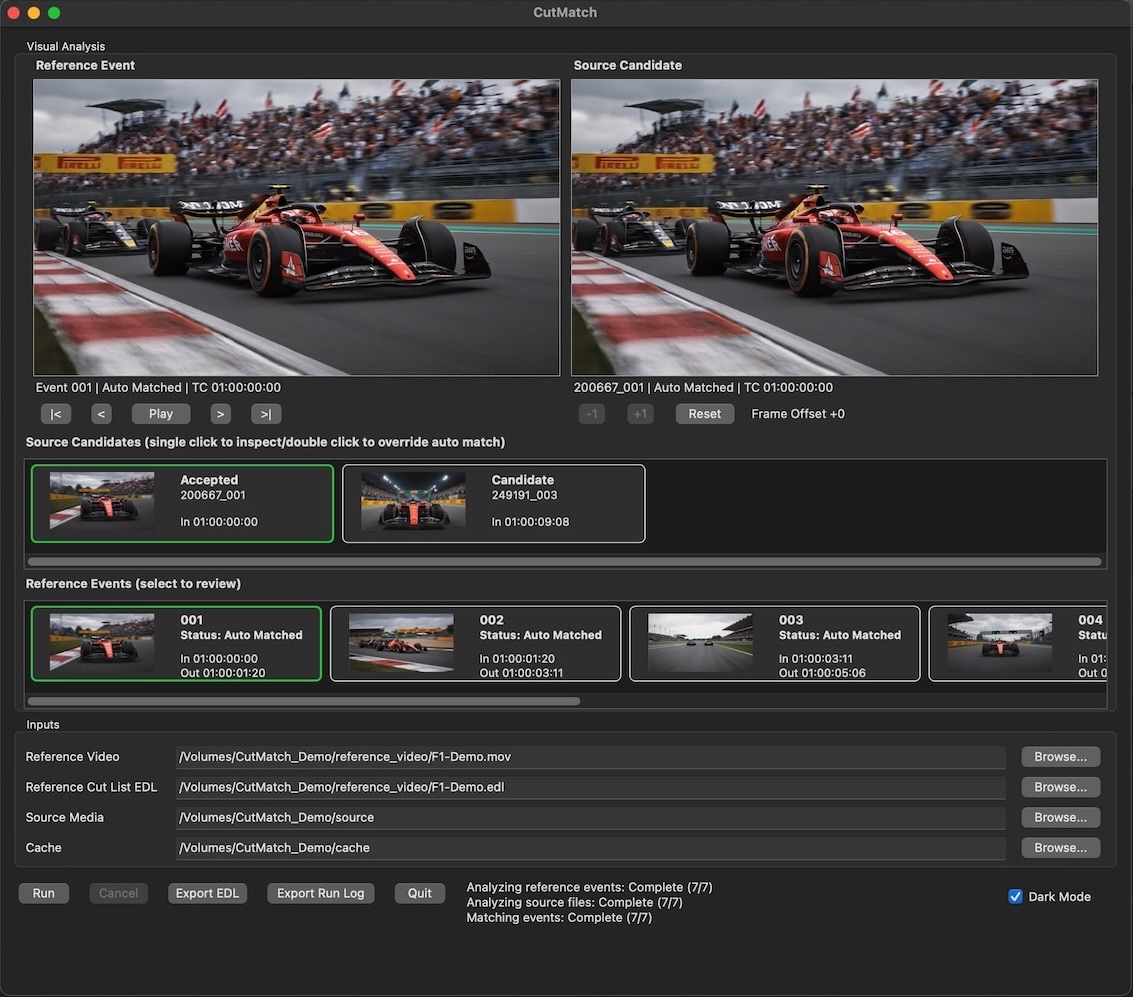
Built for flattened-reference conform problems
CutMatch helps editors overcut a longplay with source material when there is no usable clip metadata or source-referencing EDL. It is built for trailer and marketing workflows where references are often assembled from longplays, screeners, or flattened feature exports.
Frame-based visual matching
Match notched reference sections back to source media based on image content rather than clip metadata.
Reference notching
Use a supplied cut-list EDL to divide the flattened reference into searchable sections.
Candidate review
Review potential matches with side-by-side preview before committing source choices.
Conform-ready EDL export
Export a CMX3600 EDL designed to move the rebuilt source conform into the next stage of post.
Workflow
Supply a cut-list EDL to notch the reference, match each notched section against source media, review candidate matches, adjust offsets or override results manually, and export a conform-ready CMX3600 EDL.
Media support
CutMatch supports .mov, .mp4, and .mxf video files that it can analyze and decode. Common compatible codecs include ProRes, DNxHD/DNxHR, H.264, HEVC, MPEG-2, AV1, VP9, CineForm, JPEG 2000, and uncompressed video. Codec support may vary by container. ProRes RAW is not supported.
Common uses
- Rebuilding trailer conforms from flattened references.
- Matching reference events back to longplay or feature source media.
- Recovering source-based edit decisions when metadata is missing.
- Preparing conform-ready EDLs for finishing workflows.
See CutMatch in Action
Watch CutMatch match notched reference sections back to source media, support candidate review and manual adjustment, and export a conform-ready CMX3600 EDL.
Watch more demonstrations on the Cutpoint Labs YouTube channel.
Frequently Asked Questions
What problem does CutMatch solve?
CutMatch helps rebuild a source-based conform when you have a flattened reference movie, a cut-list EDL, and possible source media but no usable source clip metadata or source-referencing EDL.
Does CutMatch require a reference EDL?
Yes. CutMatch uses a reference cut-list EDL to notch the flattened reference into editorial events. CutDetect can generate that cut list when one is not already available.
Can I review or override matches?
Yes. CutMatch provides candidate review, side-by-side reference and source preview, frame stepping, manual source overrides, and source offset adjustment before export.
What media works best with CutMatch?
Clean cuts and visually matching constant-frame-rate media work best. The reference video, reference EDL, and source media should use matching frame rates and non-drop-frame timecode.
Does CutMatch export unmatched events?
No. Only matched events are included in the exported conform-ready CMX3600 EDL.